Free Shipping
On Orders over $49*
Call Us for your best package
pricing and product availability.
Call Us for your best package
pricing and product availability.






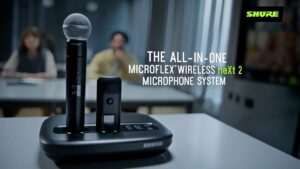
The Microflex® Wireless neXt 2 system is more than a wireless microphone. It's a two-channel, all-in-one audio solution for hybrid classrooms, training rooms, and lecture halls that provides superior audio for conferencing and presentations at the same t...

Stay in touch with Full Compass by following us in any of these social media channels.
Founded by and for industry professionals in 1977, Full Compass has remained committed to making a full assortment of professional audio, video, lighting and musical instruments accessible and affordable to customers nationwide. From day one, our mission has been to educate as well as equip our customers, by providing expert advice and training on the latest technology as well as support down the road with replacement parts and repairs. After more than 40 years, we have grown to serve your needs, and now stock 700-plus brands and 100,000 products in our state-of-the-art 80,000 sq. ft. warehouse, including live sound and studio gear, video projectors and cameras, as well as guitars, amps, keyboards, and accessories.
Shop now to save on the hottest gear, staff-selected deals and product bundles—all backed by our Low Price Guarantee and the Full Compass Promise.
New and legendary brands alike, we’re a one-stop shop for the latest and greatest solutions for your needs and budget. Upgrade your sound with microphones, mixers and speakers from pro audio leaders, including Allen & Heath, Audio-Technica, JBL, QSC, Shure, Sennheiser, and Yamaha. Boost your beats with DJ gear from Pioneer and Denon. Score killer deals on guitars, bases, amps, and keyboards from Fender, Gretsch, Nord, and Roland. Land next-level lighting from ADJ, Elation, and ETC and many more. Get started by browsing our full list of products by brand or category or chat with a Sales Pro for answers to all your Audio, Video, Lighting and Musical Instrument questions.